1. Verify that your PC is running Windows 2000, XP or vista, and has the ability to play audio files.
2. Invest in a decent microphone. This can cost between $30 and $130. It is recommended to invest more in a good microphone to improve audio quality.
3. Download and install your recording software. Audacity is an excellent audio editor and it's free. See Audacity link.
4.Record and edit your podcast.
5. Partner with an online hosting service to set up a website specifically for your podcast. See Liberated Syndication or Go Daddy.
6. Upload your new podcast to your hosting service using their simple submission page.
7. Promote your podcast!! iTunes is free along with Podcast Alley, Odeo, and Podcast Pickle.
Source: Blue Melnick (see links)
Joni
1 hour
Saturday, June 23, 2007

Wednesday, June 6, 2007
Legal Issues To Consider
Most of the following information was provided by Podcasting Legal Guide: Rules For The Revolution. See links.
When creating your own podcast it is relatively easy to make sure all necessary rights and permissions are secured if you create all of the material that is included in your podcast. If you choose to use material by other authors it becomes more complex.
Copyright law applies to podcasts because it applies to creative and expressive works. Copyright issues are going to be a huge part of what we plan to do with these educational podcasts. We will definitely need consent from the authors of our texts to create podcasts because I don't have enough personal education to make useful podcasts. I'm concerned that authors won't want to give their permission because they will probably want money or they will want to make the podcasts themselves. If we end up recording teacher's lectures it should be fine because teachers are usually more concerned with helping students learn than making money.
Publicity rights are relevant because people have the right to control how their voice, image or likeness is used for commercial purposes in public. If you plan to transmit anyone's voice or image, you should first obtain consent from that person.
Here's 5 instances that do not require permission:
1. You are using a fact, an idea, a theory or slogan, title or short phrase.
-This will be good for when I create a podcast because maybe I won't need the authors permission as long as I present the facts and information in my own way instead of reading straight from the book. The facts, ideas, and theories don't belong to the author, only the creative expression is protected by the law :)
2. You are using works that are in the public domain.
-This is difficult to understand and most likely won't apply to my purpose.
3. You are using a US government work.
4. You are making a "fair use."
5. You are using a creative commons-licensed or "podsafe" content.
-A.K.A. the work has been pre-cleared for use in podcasts.
1 hour
When creating your own podcast it is relatively easy to make sure all necessary rights and permissions are secured if you create all of the material that is included in your podcast. If you choose to use material by other authors it becomes more complex.
Copyright law applies to podcasts because it applies to creative and expressive works. Copyright issues are going to be a huge part of what we plan to do with these educational podcasts. We will definitely need consent from the authors of our texts to create podcasts because I don't have enough personal education to make useful podcasts. I'm concerned that authors won't want to give their permission because they will probably want money or they will want to make the podcasts themselves. If we end up recording teacher's lectures it should be fine because teachers are usually more concerned with helping students learn than making money.
Publicity rights are relevant because people have the right to control how their voice, image or likeness is used for commercial purposes in public. If you plan to transmit anyone's voice or image, you should first obtain consent from that person.
Here's 5 instances that do not require permission:
1. You are using a fact, an idea, a theory or slogan, title or short phrase.
-This will be good for when I create a podcast because maybe I won't need the authors permission as long as I present the facts and information in my own way instead of reading straight from the book. The facts, ideas, and theories don't belong to the author, only the creative expression is protected by the law :)
2. You are using works that are in the public domain.
-This is difficult to understand and most likely won't apply to my purpose.
3. You are using a US government work.
4. You are making a "fair use."
5. You are using a creative commons-licensed or "podsafe" content.
-A.K.A. the work has been pre-cleared for use in podcasts.
1 hour
Wednesday, May 16, 2007
3 Simple and Cost-Effective Methods To Improve Acoustics of Podcasts
3 Steps Before Recording:
www.RecordBetterAudio.com (episode 2-April 16, 2007)
1. What is directly below you and your microphone? Cement or hardwood floors must be covered with carpet or a rug to prevent sound waves from bouncing off the floor up into the microphone. If the microphone is sitting on a desktop stand, a small piece of carpet should be placed under it.
2. Use a pop filter. A pop filter is designed to break up the breath of air from your mouth when pronouncing certain words with the letters P or T in them. The pop filter is a thin piece of fabric mounted on a stand. It is usually placed 3-6 inches from your mouth and the microphone is placed about 3 inches from it. It is simple, but worth having and costs about $30.
3. Find a towel and wrap it entirely around the microphone except in front where the pop filter is located. This will help to eliminate any ambiance in the room and absorb it before sound waves are recorded in the microphone.
1 hour
www.RecordBetterAudio.com (episode 2-April 16, 2007)
1. What is directly below you and your microphone? Cement or hardwood floors must be covered with carpet or a rug to prevent sound waves from bouncing off the floor up into the microphone. If the microphone is sitting on a desktop stand, a small piece of carpet should be placed under it.
2. Use a pop filter. A pop filter is designed to break up the breath of air from your mouth when pronouncing certain words with the letters P or T in them. The pop filter is a thin piece of fabric mounted on a stand. It is usually placed 3-6 inches from your mouth and the microphone is placed about 3 inches from it. It is simple, but worth having and costs about $30.

3. Find a towel and wrap it entirely around the microphone except in front where the pop filter is located. This will help to eliminate any ambiance in the room and absorb it before sound waves are recorded in the microphone.
1 hour
Letterboxing
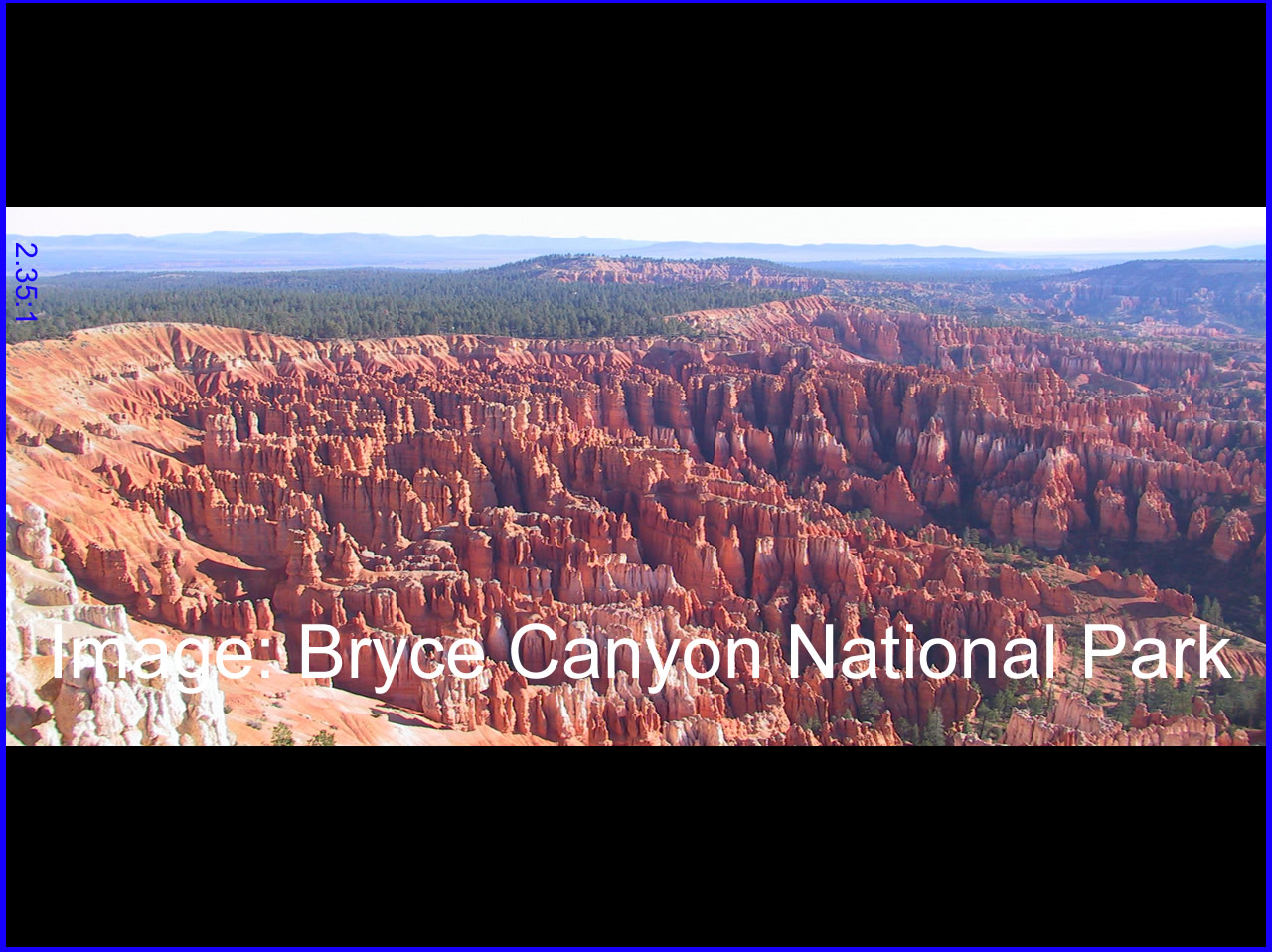
So, why is letterboxing an important concept to understand?
The students last semester who attempted to podcast a 3 hour lecture ended up spending about 9 hours trying to make that podcast available online. One of the reasons it took so long was trying to transfer the widescreen film to video formats A.K.A. Letterboxing. We will make sure the video camera is set to record on widescreen to prevent this time-consuming task from being a necessary step.
Letterboxing is the practice of transferring widescreen films to video formats while preserving the original aspect ratio. Since the video display is most often a more square aspect ratio than the original film, the resulting video must include masked-off areas above and below the picture area (often referred to as "black bars," or, more accurately, as mattes). Letterboxing takes its name from the similarity of the resulting image to a horizontal opening in a postal letter box. LTBX is an acronym used for programming using this format.
Letterboxing offers an alternative to the pan and scan or full screen method of transferring a widescreen film to video. In pan and scan, the original image is cropped to suit the 1.33:1 (or 4:3) ratio of the television screen. In contrast, letterboxing preserves the original composition of the film as seen in the theater.
Letterboxing was intended for use on a 4:3 display in a time when widescreen TVs had yet to catch on. Any letterboxed material will usually be stretched to fill the display on a widescreen TV and look distorted, however, using the vertical stretch feature on the TV or DVD player will correct this.(Wikipedia 2007)
http://en.wikipedia.org/wiki/Letterbox
1 hour
Monday, May 14, 2007
May 14, 2007
Today is the official 1st day of the semester, but I've been familiarizing myself with podcasting for a couple of weeks now. So far so good. I've subscribed to a few different podcasts, which was my 1st assignment. The trouble I'm having is that I only have a 4GB ipod nano so I've had to delete a lot of music from my ipod to make room for podcasts. Since my ipod doesn't have video capabilities I have been unable to transfer many of the podcasts from itunes to my ipod so I've had to sit at the computer for quite a while to watch all of the podcasts. So far my favorite podcast to listen to is by Mark Hoppus. He's pretty interesting and he introduces a lot of new up-and-coming bands. Mark was in Blink-182 but now he is in a new band called Plus44. http://www.himynameismark.com/podcasts/podcast.xml
So far I have spent 4 hours familiarizing myself with how most podcasts work and subscribing to and listening to numerous podcasts.
I just found this video which describes how to download a podcast from the iTunes store into your personal iTunes account. This is a very easy process, but I'll post this video just in case. See "How To Download From iTunes" under links on the left side of this page.
Joni
4 hours
So far I have spent 4 hours familiarizing myself with how most podcasts work and subscribing to and listening to numerous podcasts.
I just found this video which describes how to download a podcast from the iTunes store into your personal iTunes account. This is a very easy process, but I'll post this video just in case. See "How To Download From iTunes" under links on the left side of this page.
Joni
4 hours
Subscribe to:
Posts (Atom)